
See the Bigger Picture: Introducing Property Dashboards in BHM Web
Managing a property portfolio involves keeping track of thousands of individual details — vacancies, inspections, maintenance, rent arrears, rent reviews and tenancy information. Finding that information quickly and turning it into something useful for decision-making can be a challenge.
BHM Web’s Property Dashboards bring this information together in one place, giving management and property teams a live, visual view of their property portfolio while still providing the ability to drill down into individual properties and tenancy agreements.
Importantly, the dashboards are based on live system data, giving users an up-to-date view rather than relying on manually prepared reports.
From portfolio overview to individual property
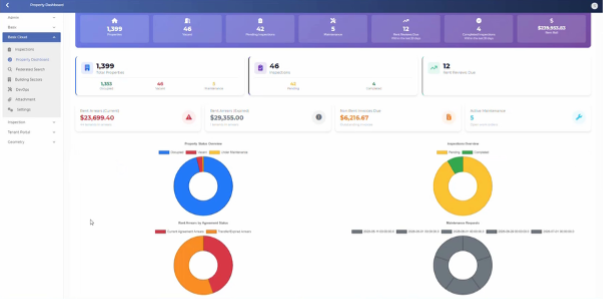
The Property Dashboard starts with an at-a-glance overview of the organisation’s property portfolio.
Key measures include:
- Total number and vacant properties
- Properties with maintenance agreements
- Inspections due and completed
- Rent reviews due within the next 30 days
- Current and expired tenancy arrears
- Non-rent invoice balances
- Total rent roll for the current billing period
Charts provide a quick visual summary of this information, with hover-over details providing the underlying numbers. Users can move from the high-level picture into the underlying data whenever more detail is required.
The dashboard can be filtered to an individual property manager, allowing the same dashboard to become a personalised portfolio view, which means the dashboards can serve both strategic management reporting and everyday operational management — executives can look across the entire portfolio, while property managers can focus on the properties they are responsible for.
Understand your workload distribution
The Properties dashboard provides a breakdown of properties by property manager or tenancy officer, making it easy to understand workloads and portfolio distribution.
The dashboard allows you to see the number of properties being managed by each person, with additional breakdowns by service status and housing programme. The underlying property data is also available in a searchable, sortable grid.
Get a clearer view of rent arrears
The Arrears dashboard provides a visual picture of outstanding arrears across the portfolio.
Arrears can be broken down by the age of the arrears, helping teams quickly identify where older or more significant arrears may require attention.
The dashboard also provides the underlying property and agreement data, including the number of units in arrears, total units and the value of arrears associated with each property.
Stay on top of vacancies
Vacancies can have a significant impact on both service delivery and rental income.
The dashboard provides a view of vacancies by property manager, including the number and how long properties have been vacant. Supporting data is available so users can move from the summary directly to the properties requiring attention.
This makes it easier for teams to identify properties where reducing turnaround time could have the greatest benefit.
Manage inspections more effectively
The Inspections view brings together pending and recently completed inspections.
Managers can see pending inspections by property manager, while completed inspections from the previous 30 days can be reviewed along with their supporting details.
For organisations managing unit complexes, a dedicated view provides an additional picture of each building, including occupied, vacant and maintenance units.
Keep maintenance and turnaround visible
The Maintenance dashboard shows properties currently covered by maintenance agreements and provides visibility of planned completion timeframes.
Properties can be viewed according to their property manager and status, including pending work and current vacancies.
This provides another important piece of the vacancy-management picture: not just knowing that a property is vacant, but understanding whether maintenance activity is contributing to the vacancy and when the property may become available for a new tenant.
Never miss a rent review
The Rent Reviews view highlights rent reviews due within the next 30 days, with the information available by property manager and in the supporting data.
Rather than relying on separate reports or manually checking individual records, teams can use the dashboard to identify upcoming work and focus their attention where it is needed.
Search, filter and drill into the detail
While dashboards provide the big picture, BHM Web doesn’t stop at charts.
Users can:
- Sort data by individual columns
- Filter lists to specific values
- Search for properties or property managers
- Filter the entire dashboard by property manager
- Drill from charts into the underlying records
- Navigate from portfolio information to individual property and tenancy details
This combination of visual summaries and detailed underlying data means users don’t need to switch between multiple reports to understand what is happening.
See your properties on a map
The dashboards also include geospatial information, allowing users to see properties across the portfolio on a map.
Users can zoom into geographic areas, select individual properties and then zoom into the underlying property and tenancy records. Unit blocks can also be explored to see the individual properties within the complex.
This provides a different way of understanding the portfolio — particularly useful for organisations managing properties across multiple locations.
Turning data into better decisions
The real advantage of the new Property Dashboards is not simply that they provide more charts.
They bring together live operational information, visual reporting and detailed property data in a single experience.
For management, this means a clearer understanding of the overall portfolio.
For property managers, it means an easier way to identify the properties and tenants requiring attention.
And for the organisation as a whole, it provides a stronger foundation for proactive property management, improved visibility and better decision-making.
BHM Web Property Dashboards put the information you need in front of you — from the entire portfolio down to the individual property.
Questions? Contact us now to find out more